Snapshot
Problem
A workshop lives on people coming back. When the car is next due sits on a slip of paper in the glovebox that nobody reads.
Goal
The customer sees their history and their next date without an account and without an app. The business sees each morning who is overdue.
My role
Concept, design, build and data model, solo. Plus two structural variants of the home page.
Outcome
A service book you enter with a number plate and four digits, and a back office that works out the next appointment itself.
Context
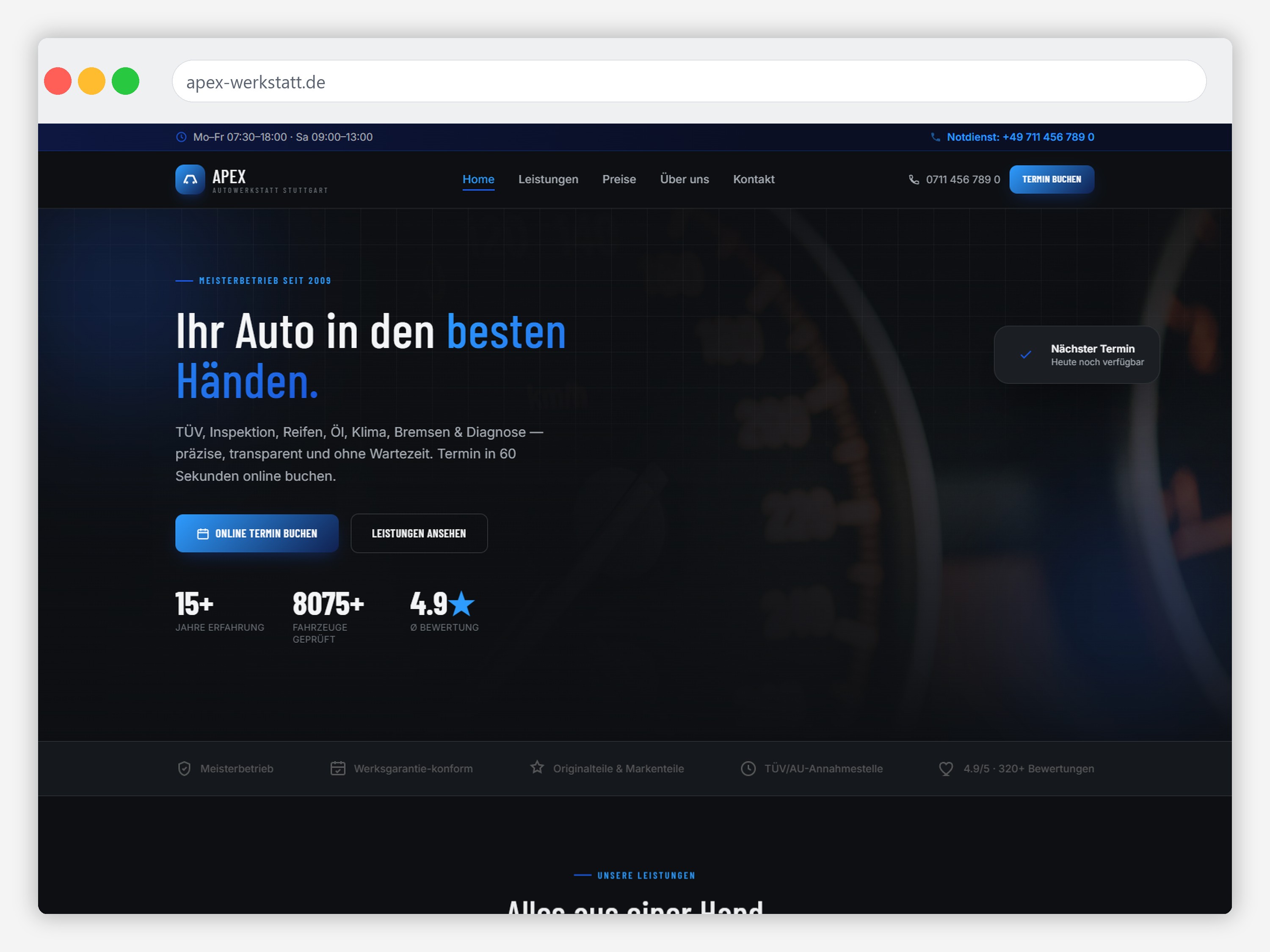
A workshop website has a visitor who is in a hurry and in a bad mood. Something is lit, something is rattling, the inspection is due. Nobody is here to read about spark plugs.
That visitor asks three questions, in this order: do they even do this? what does it cost? when can I get an appointment? Most workshop sites answer the first inside a dropdown, the second not at all, and the third with a phone number.
So seven services (inspection, servicing, tyres, oil, air conditioning, brakes, diagnostics) had to be graspable without anyone opening a menu. That was the first half of the work, and the structural comparison further down is about it.
The second half came from a question a website alone does not answer: what brings this customer back in twelve months? The statutory inspection every 24 months, servicing and oil every 12 months or 15,000 kilometres, tyres twice a year. The demand is there and it repeats. The customer just does not know the date, and the business only finds out at the next service that they went somewhere else.
How to read this project
APEX is a concept project. The business, the prices, the figures and the reviews are invented; there was no client and no user research. The design, the build, both structural variants and the measured scores are real.
Highlight · The digital service book
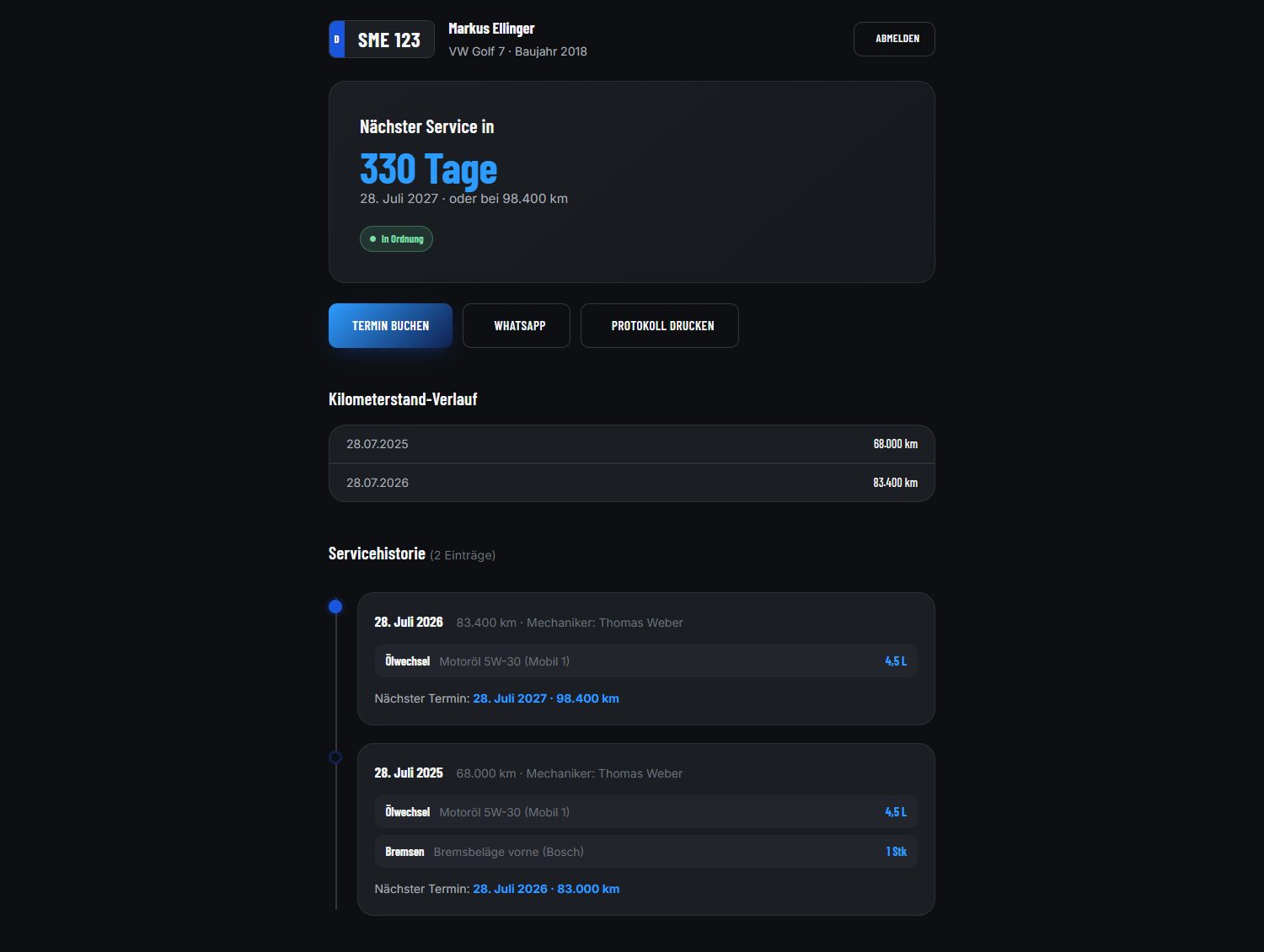
The printed service book lives in the glovebox. It comes out when the car is sold and at no other time. Everything in it is invisible to the owner until they go looking, and completely out of reach for the workshop the moment the car leaves the yard.
So I put it where both of them will find it: in the website. One page for the customer, one for the business, the same data seen from two sides.
Signing in without an account
The customer types their number plate and the last four digits of the phone number already held in the customer file. No registration, no password, no confirmation email.
That is the real decision here. Someone who visits a workshop twice a year will not create an account for it. A flow with registration would have had the feature and none of the use.
The two together are known only to the person who drives the car and is in the file. For a service book that is the right height of hurdle: high enough to keep strangers out, low enough to manage at a red light.
The list the business opens in the morning
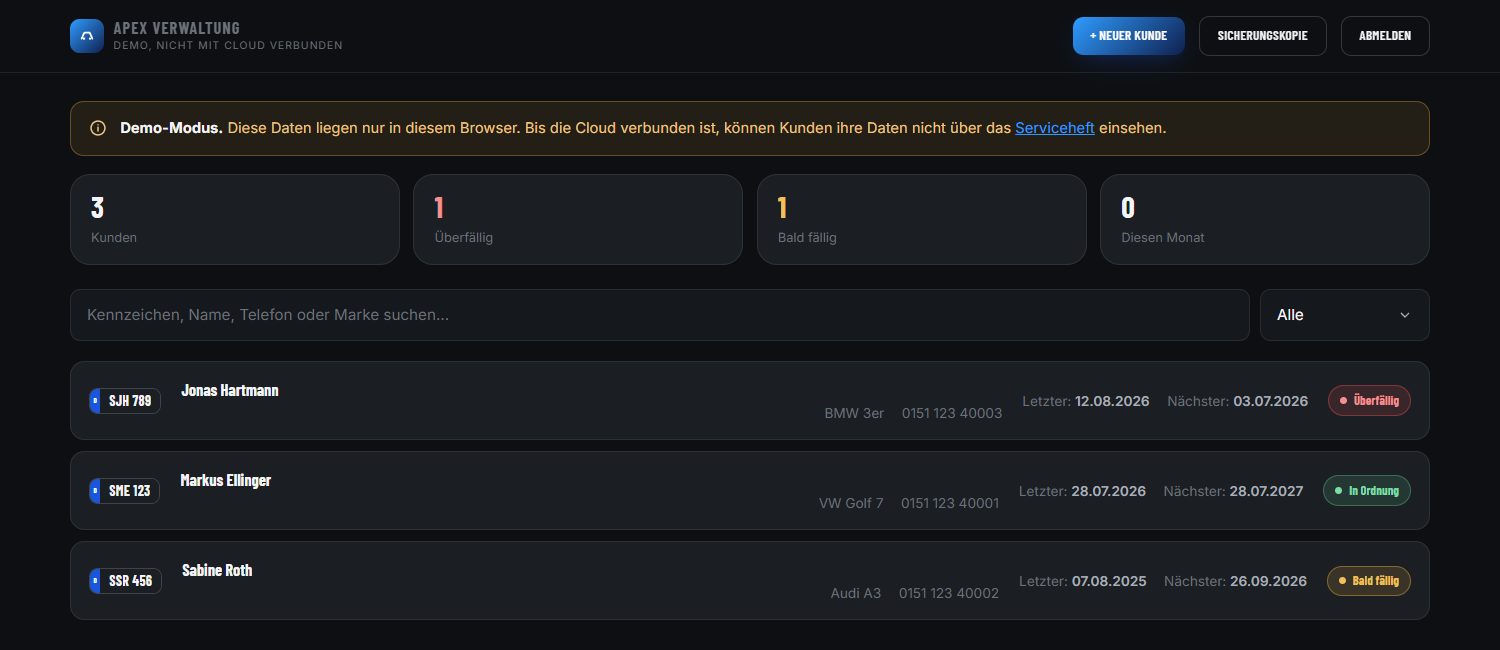
The back office is not in the site menu and is kept out of search engines through robots.txt. It is a tool, not a page of the website.
Four numbers sit at the top: customers, overdue, due soon, done this month. Below them the customer list, searchable by plate, name, phone or make, each row carrying a coloured status.
That answers the one question anyone opens this page with: who should I call today? From a customer card, “send reminder” opens WhatsApp with the message already written.
The next appointment works itself out
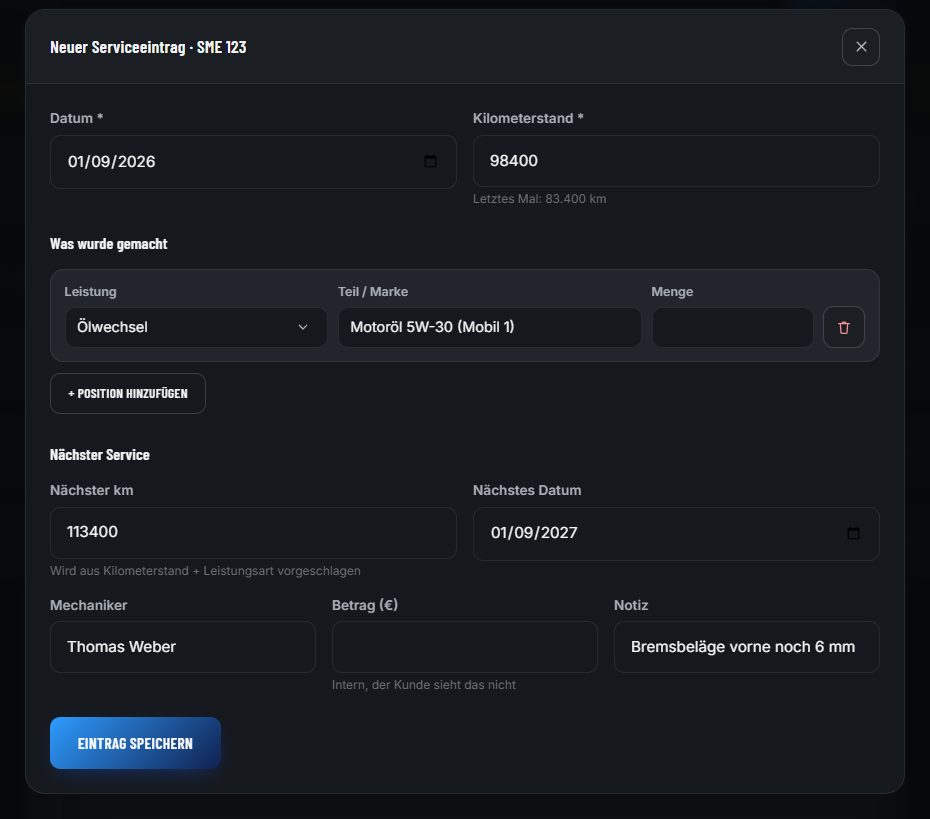
After every service an entry is written: date, mileage, then line by line what was done, with part, brand and quantity.
From the first of those lines and the mileage, the system proposes the next appointment: an oil change at 98,400 km becomes 113,400 km and a date one year on. It can always be overwritten — it is a proposal, not a rule.
This is where the whole thing becomes cheaper for the business than the paper slip: the follow-up date is a by-product of writing the entry, not a second job waiting at the end of the day.
How it runs, briefly
- New customer. Plate, phone, name, make and model. The form for the first service entry opens straight afterwards.
- After every service. Find the customer, add an entry, record the line items. The next appointment is already there when you finish.
- The customer sees it at once. As soon as it is saved, the entry stands in their service book, with nobody having to send them anything.
- When it falls due. The status turns to “due soon”, later to “overdue”. One button opens the reminder.
Once a month, “backup” downloads the whole file as a CSV that opens in Excel. A business that trusts its customer file to a system should be able to hold that file in its hands without the system, at any time.
Four decisions inside the system
The lockout lives in the database
Five wrong attempts in fifteen minutes lock the plate. That is checked in the database, not in the browser: in the browser, an open developer console would be the end of it.
The plate is not corrected
German plates have no fixed length (S-AB 1234, M-X 12). Autocorrection could send someone into a stranger’s record. So: upper case, spaces removed, and nothing else.
Internal stays internal
Amount and note sit in the same form as everything else but never appear in the customer’s service book. The business needs somewhere to put “keep an eye on the oil loss” without it becoming an announcement.
Two steps to the cloud
With no credentials stored, everything runs on in the browser with test data, and the page says so itself in a notice. Only with Supabase do customers see their data from their own phone.
What the proposal cannot do: intervals exist only where they exist in the trade, so for the statutory inspection, servicing, oil, air conditioning and tyres. For brakes, diagnostics and anything else the system proposes nothing, because an invented interval would be worse than an empty field. Those dates the business enters by hand.
Before that · two structures, one discarded
Before the system came along, there was the question of the home page. I had a structure that worked. That is the moment you normally keep building, and never find out whether the first idea was also the best one or merely the first.
So I built a second home page from scratch: different hero, different order, all seven services immediately as an icon row, plus an annotated engine graphic with four inspection points. Not a sketch: a finished page, because there is no other way to compare.
Variant 2 · discarded
Leads with a technical claim, shows all seven services as an icon row directly below the hero, and uses an annotated engine graphic to explain what gets checked during a service.
Why not: the icon row says that a service exists, not what it costs or how long it takes. Someone deciding under time pressure is no further along afterwards.
Variant 1 · chosen
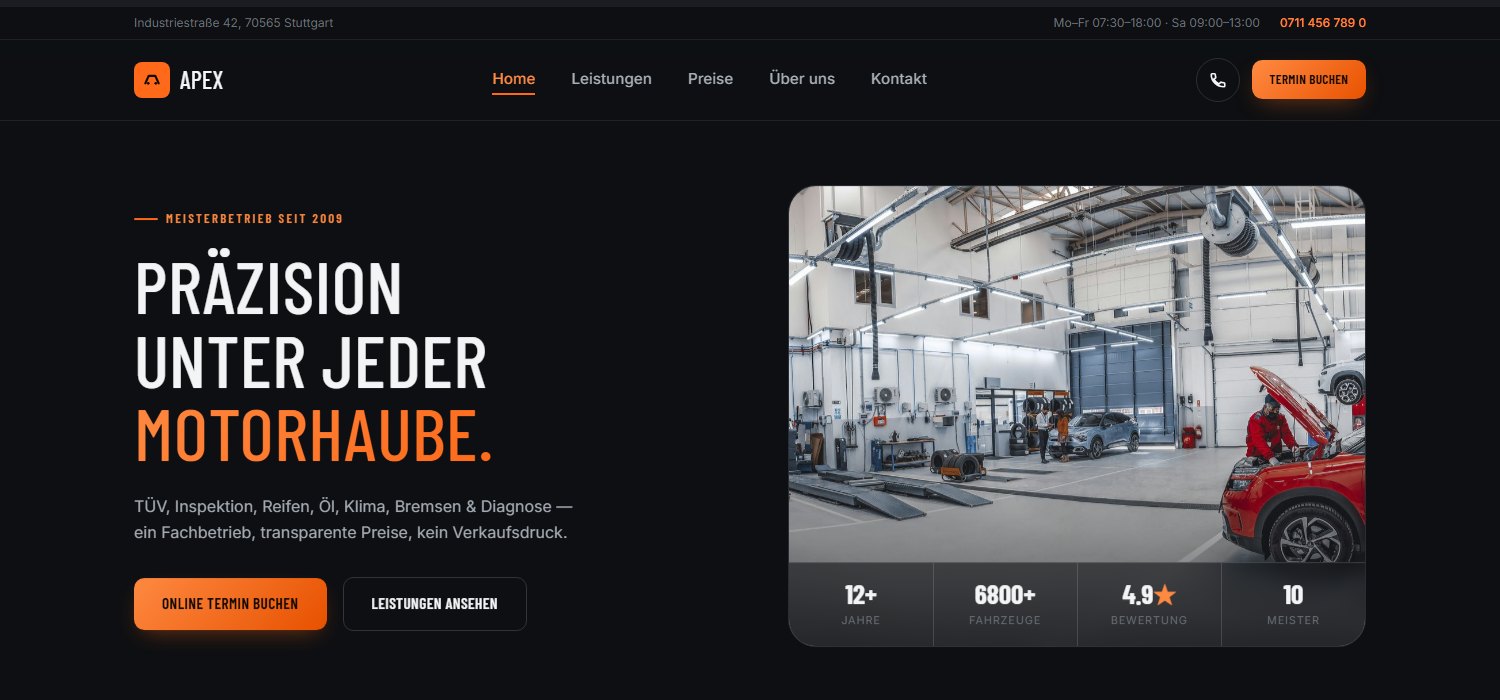
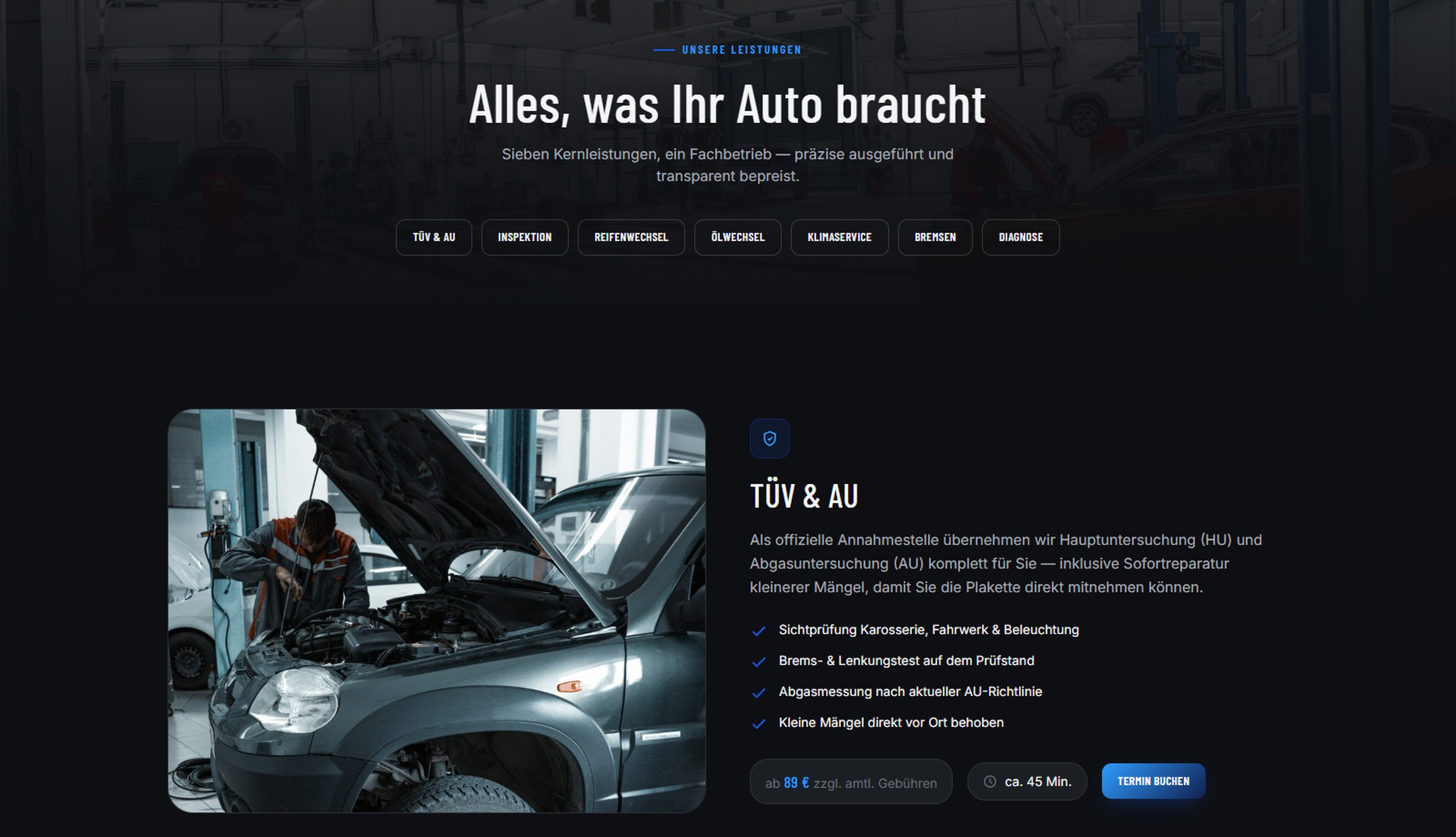
Leads with a promise and three proof figures, then services as cards: each with a real workshop photograph, a starting price and a duration.
Why: three cards saying “from €89” answer more than seven icons without a price. The remaining four services are one click away. Enough for someone who is looking for them.
Design
Three decisions, all following from the visitor’s hurry.
Price before the phone call
Every service names a starting price and a duration. That is the information people otherwise call for, and the call that often never happens.
Anthracite, not midnight black
The dark treatment should read as workshop, not gaming. The blue accent was pulled back repeatedly until it felt precise rather than showy.
Proof, not adjectives
Master workshop, warranty-compliant servicing, official inspection point: checkable statements instead of “your reliable partner”.
Accessibility
While building this case study I audited the site and found two real contrast failures, both in the kind of area you overlook while designing, because it is small and grey:
- The certification strip sat at 2.4:1, barely half the WCAG AA minimum. The cause was an opacity of 0.7 applied to an already pale text colour.
- The footer sat at 3.61:1, also below the 4.5:1 threshold.
Fixing the first is what made the second appear at all: contrast failures mask each other. Accessibility went from 95 to 100.
Debugging · The page jumped while loading
The first measurement was poor: Cumulative Layout Shift 0.318, the score for how much a page moves while it loads. Anything above 0.1 counts as unstable. In practice: you start reading and the text slides away.
I guessed wrong three times before the cause was settled. Each guess was disproved within ten minutes, because I re-measured after every one instead of arguing.
- Unsized images. 95 images across all projects now carry
widthandheightfrom the file. Correct, and kept, but it changed the shift score not at all. - Font swapping. Switched to
font-display: optionalas a probe, so the fallback is never swapped out. Unchanged. Reverted. - The animated figures. The counter rewrites its text every frame, so the element widens with each digit. It sounded convincing; Lighthouse scored that exact element 0.000.
The report names the shifted element itself: the decorative grid overlay in the hero, moved by roughly 300 pixels. It sits absolutely inside the hero, so something above it must have suddenly disappeared.
It was the mobile menu. It had overflow: hidden and a transition, but no initial height in the stylesheet. It was collapsed by JavaScript. So the page rendered with the menu fully open, then the script ran, closed it, and everything below jumped up by its height. Exactly those 300 pixels.
The fix is one line of CSS: ship the menu collapsed instead of collapsing it. Shift score 0.318 → 0, performance 61 → 78. The same bug was in two other projects and is fixed there too.
Outcome
Measured with Lighthouse against the published site, mobile, in a private window:
78
Performance
100
Accessibility
100
Best Practices
100
SEO
Largest Contentful Paint 4.3 s · Total Blocking Time 0 ms · Cumulative Layout Shift 0. Before the debugging below this read 61 at a shift score of 0.318. What remains is the hero image’s load time. A single clean measurement, not the best of several runs; the scores move by a few points between runs. What was measured is the website; the service book and back office came later and are not part of these numbers.
A service book without an account
A number plate and four digits are enough. History, mileage and the next date stand ready for the owner.
Follow-ups as a by-product
The next date appears while the entry is written, not as a second job. The business sees each morning who is overdue.
Price before the call
All seven services state a starting price and a duration up front.
Loads without jumping
Shift score 0.318 to 0, performance 61 to 78.
What I learned
A second variant costs less than you expect
The second home page took a day, because the colour system, the components and the content already existed. Set against the risk of defending the first structure for months, that is cheap.
More visible is not more answered
Variant 2 showed seven services instead of three and still helped less. Visibility is not the same as a basis for deciding. That was the real return on the comparison.
The way in decides whether a feature gets used
On the service book, the part I thought about longest was not the history but the sign-in field. With registration it would have been technically tidier and would have stayed empty. A plate and four digits are the weaker lock and the only one anyone actually uses at a red light.
What I would test next
Whether the four services not shown on the home page are actually found. I would give five people the task “find what an air-conditioning service costs” and watch. On the service book I would watch someone type their own plate: with a hyphen, with a space or with neither, and whether the four digits are understood without explanation. And the hero image’s load time, which is now the limiting number.
In short
A workshop lives on people coming back, and the date that decides it sits on a slip of paper nobody reads. So I moved the service book into the website: the owner gets in with a plate and four digits and sees their history and their next date, the business opens a list each morning showing who is overdue, and the follow-up date works itself out as the entry is written.
Before that came the question of the home page. To be sure the first structure was not simply the first, I built a second one in full and compared them, and discarded the one that showed more but answered less. Both stay online so the decision can be checked.
See it live
Both structural variants are reachable, so the comparison of the home pages can be judged first hand.
Open variant 1 → See variant 2
Concept project: the business, prices and contact details are invented. With no credentials stored, the service book and back office run in demo mode, on test data held in the browser; the published demo currently shows the state of the website without that part.